


5 Tips to Record High-Quality Podcasts Without Breaking the Bank

Podcasting has become one of the most powerful ways to share ideas, build a personal brand, and connect with a loyal audience. The good news? You don’t need an expensive studio or high-end equipment to create a high-quality podcast. With the right setup, techniques, and planning, anyone can start professional podcast recording on a budget.
Whether you’re a beginner, content creator, entrepreneur, or brand, these five practical tips will help you improve audio quality, reduce noise, and sound professional—without overspending.
1. Choose the Right Budget Microphone
Your microphone matters more than any other piece of equipment. Clear audio builds trust and keeps listeners engaged.
You don’t need studio-grade gear to sound good. Many affordable podcast microphones deliver excellent results.
Budget-Friendly Options Include:
USB microphones for beginners
Dynamic microphones for noise control
Lavalier microphones for mobile or interview podcasts
Focus on clarity and noise rejection rather than brand names. A good mic alone can instantly elevate your podcast audio quality.
2. Record in a Quiet, Controlled Environment
A silent room is more valuable than expensive gear. Background noise, echo, and room reverb are common problems in home podcast recording.
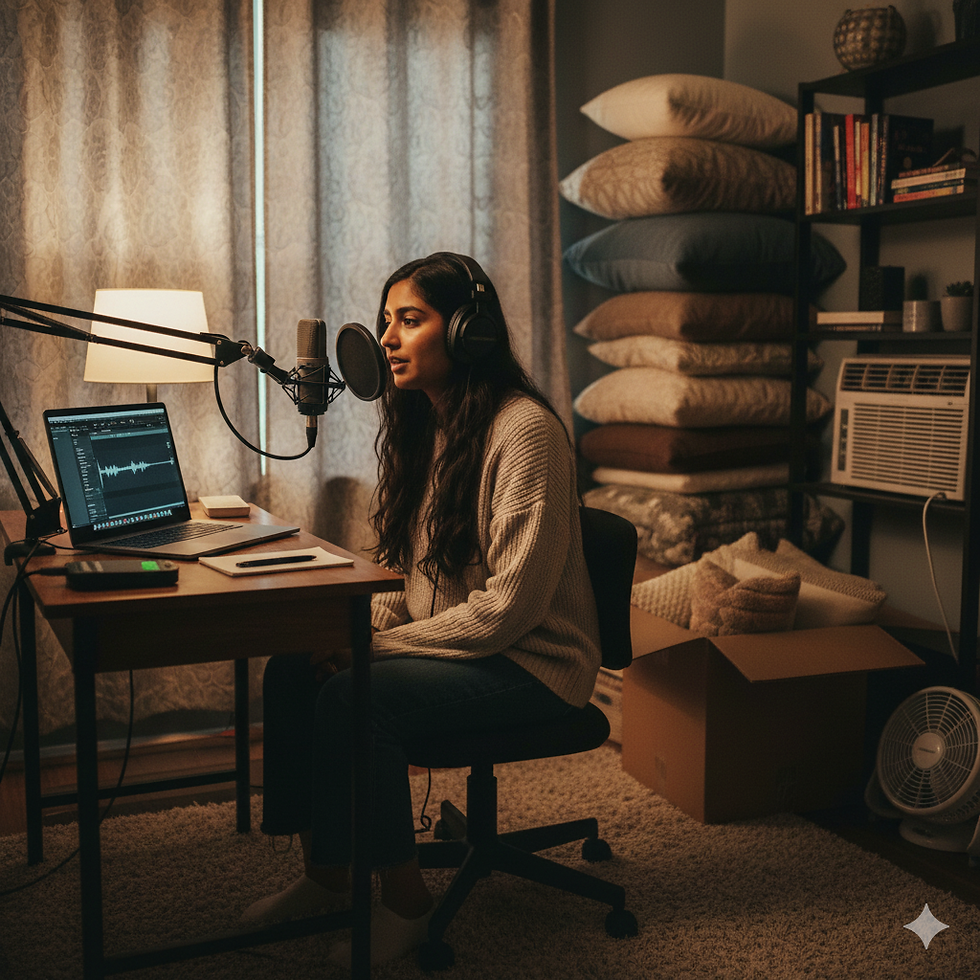
Simple Ways to Improve Acoustics:
Record in a small room
Use curtains, carpets, or cushions to absorb sound
Turn off fans, ACs, and background electronics
Record during quieter hours
This DIY setup can dramatically improve home podcast studio sound quality at zero cost.
3. Use Free or Low-Cost Recording Software
You don’t need paid software to record or edit podcasts professionally. Several free podcast recording tools offer excellent features.
Popular options include:
Audacity
GarageBand
Anchor (Spotify for Podcasters)
OBS for video podcasts
These tools support noise reduction, trimming, compression, and audio balancing—perfect for beginners and intermediate podcasters.
4. Monitor Audio While Recording
Always use headphones during recording. Monitoring helps you detect issues like distortion, background noise, or mic distance problems in real time.

Podcast Audio Tips:
Maintain a consistent mic distance
Speak clearly and naturally
Avoid sudden movements
Pause instead of restarting when mistakes happen
Monitoring ensures smoother editing and cleaner final output.
5. Edit Smart, Not Heavy
Editing doesn’t mean over-processing. The goal is to sound natural and clear.
Basic podcast editing should include:
Noise reduction
Volume leveling
Removing long pauses
Cutting background distractions
Avoid excessive filters. Clean, simple edits make your podcast sound professional and listener-friendly.
Bonus Tip: Plan Your Podcast Before Recording
Preparation reduces recording time and editing work.
Plan:
Episode structure
Talking points
Guest questions
Episode length
Good planning leads to confident delivery and better content flow—making your podcast sound more professional even on a budget.
Why Audio Quality Matters in Podcasting
Listeners are more likely to stop listening due to poor sound quality than content quality.

Clean, clear audio helps:
Build credibility
Improve listener retention
Grow podcast subscribers
Attract sponsorship opportunities
High-quality podcast production is an investment in long-term growth—even when done affordably.
Conclusion
Creating a high-quality podcast doesn’t require a huge budget. With the right microphone, a quiet recording space, free editing tools, and smart techniques, anyone can produce professional-sounding episodes from home.
Consistency, clarity, and planning matter more than expensive gear. Whether you’re starting your first show or improving an existing one, these budget podcast recording tips will help you sound polished and confident.
If you ever want expert guidance, production insights, or professional support, teams like Canvas Production often help creators refine their podcast setup while keeping costs practical and manageable.


Comments